Does Whyfull delete anything?
Scanning doesn’t delete anything. Cleanup is a separate action you control; the optional viewer Trash feature requires confirmation.
Models, caches, and forgotten worktrees. One report with sizes and cleanup guidance, ready for you or your coding agent.
Paste into your local coding agent.
Free & open source. Runs locally. No automatic deletion.
 AI models
Docker cache
Git worktrees
Package & app caches
AI models
Docker cache
Git worktrees
Package & app caches
Find the leftovers from the tools you use every day.
Find bulky caches, models, and worktrees.
Get sizes, context, and cleanup guidance.
Let your agent work through the report, or follow it yourself.
npx whyfull --jsonnpx whyfullGive your agent the same local reports you can explore in the app. Run this command and choose your agent.
npx skills add iplanwebsites/whyfull --skill whyfullScanning doesn’t delete anything. Cleanup is a separate action you control; the optional viewer Trash feature requires confirmation.
No. Some files matter; some caches cost time to rebuild. Whyfull helps you decide what to keep.
Whyfull runs locally. You choose what to share with your agent; reports can include private paths.
The app and CLI include the same local disk viewer. Drill into folders, compare their sizes, and find what’s worth clearing out.
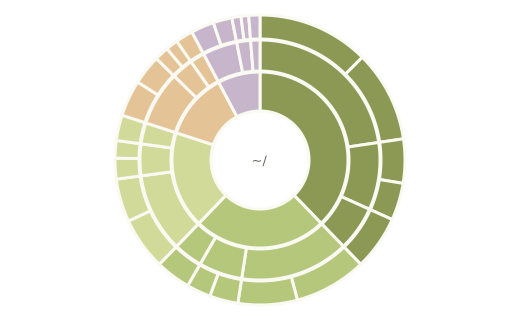
Move through folders with the radial view.
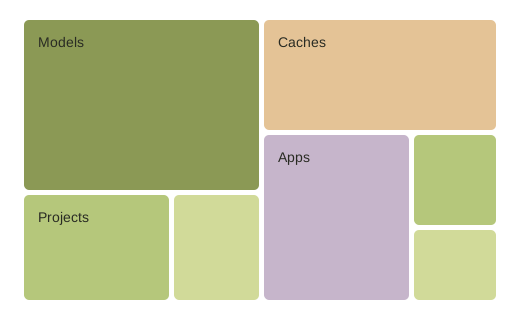
Compare directories at a glance with the treemap.
Or open the viewer from your terminal:
npx whyfull --viewStart with a prompt, install the skill for future runs, or explore visually in the app. The desktop app includes the CLI.
Free. Private. Open source.
Paste into your local coding agent.